

Parent, coach and tournament — one team
The parent films a bout at the mat — the coach gets it in the journal and prepares the athlete — the organizer runs the tournament, and the results come back to everyone. Everyone gets what they need, and the athlete grows faster.
For parents
Be there for every bout
- Every bout with video, scores and replay — nothing lost in the gallery
- Analytics across every tournament: strengths and weaknesses — yours and the opponent’s
- Know the opponent before the mat: how he fights and where he was caught
- See how many wins are left to the next rank
- Score like a referee — and start to understand refereeing
The coach sees your child’s bout even when standing at another mat.
Parent editionFor coaches
See the whole team — even where you aren’t
- Twenty athletes on three mats? Parents film — every bout is yours
- Bout review from simple to full: referee-style scores or both athletes’ technique on video
- Analytics for each athlete across every tournament: strengths and weaknesses — yours and the opponent’s
- Ranks are counted automatically: who needs how many wins
- Judge at other tournaments from your own phone
The organizer gets your entry as a ready file — no retyping.
Coach editionFor organizers
A tournament that runs like clockwork
- Entries arrive as ready files — not a single name typed by hand
- Seeded draw in one tap, brackets and bout queue on every mat
- Parents see “who fights where” in the tournament channel — fewer questions for the secretary
- Sponsor ads on the scoreboard between bouts
Coaches with the Coach edition step in as mat and weigh-in officials.
Tournament editionAnd the biggest winner is the athlete: every bout saved and reviewed, progress visible from tournament to tournament — in numbers, not from memory.
Features
Bout scoring, video and analytics
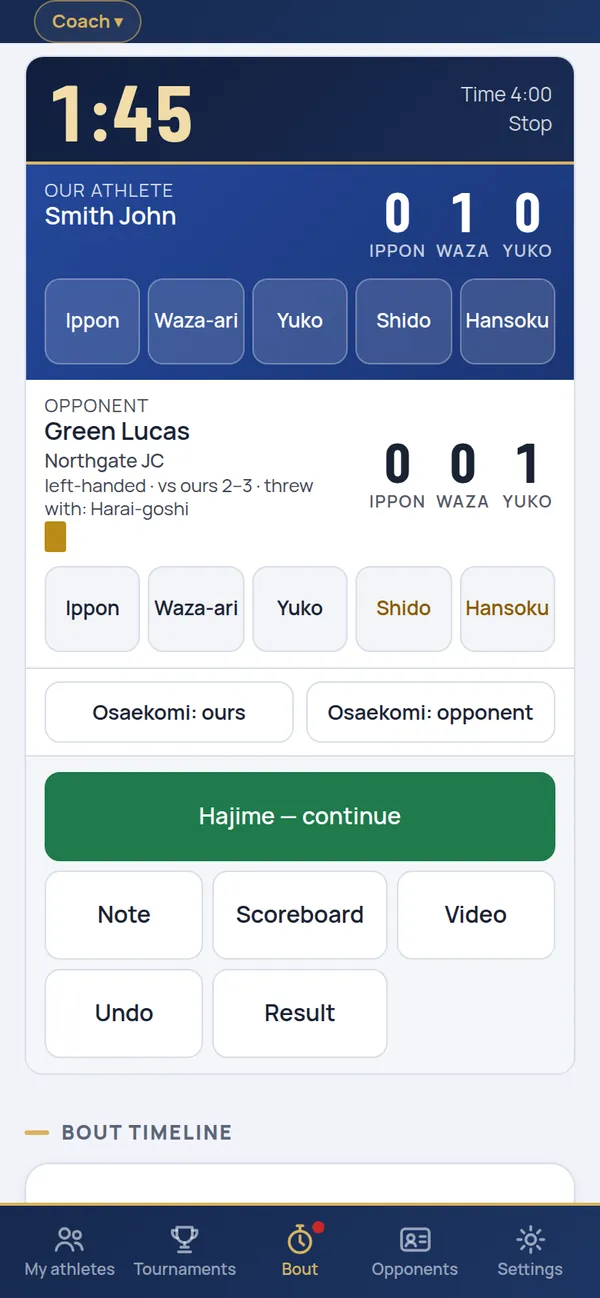
Scores take one tap, just like the referees’, and you can film the bout and watch it again in slow motion. Athlete analytics and opponent scouting build up by themselves from your bouts.
- Scoreboard timer for judo and sambo: ippon, waza-ari, yuko, shido, osaekomi, golden score; sambo points, activity, warnings, hold-downs and submissions
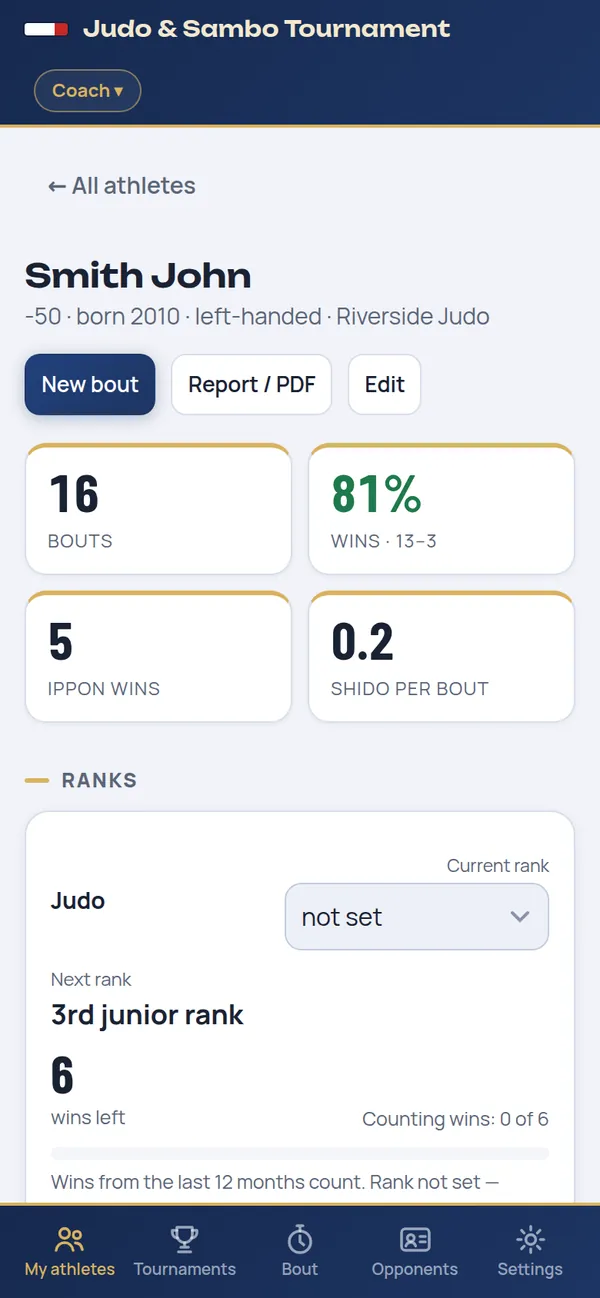
- Athlete card: win rate, clean wins, techniques scored and conceded, progress by tournament
- Scouting: how an opponent beat your athletes and how you caught him
- Ranks by country: Russian EVSK with wins left and a notice when the standard is met; CIS ranks and kyu/dan belts elsewhere
- Reports in PDF, Word and Excel; share protocols or your whole journal with another coach
Your own tournament — from entries to the final protocol
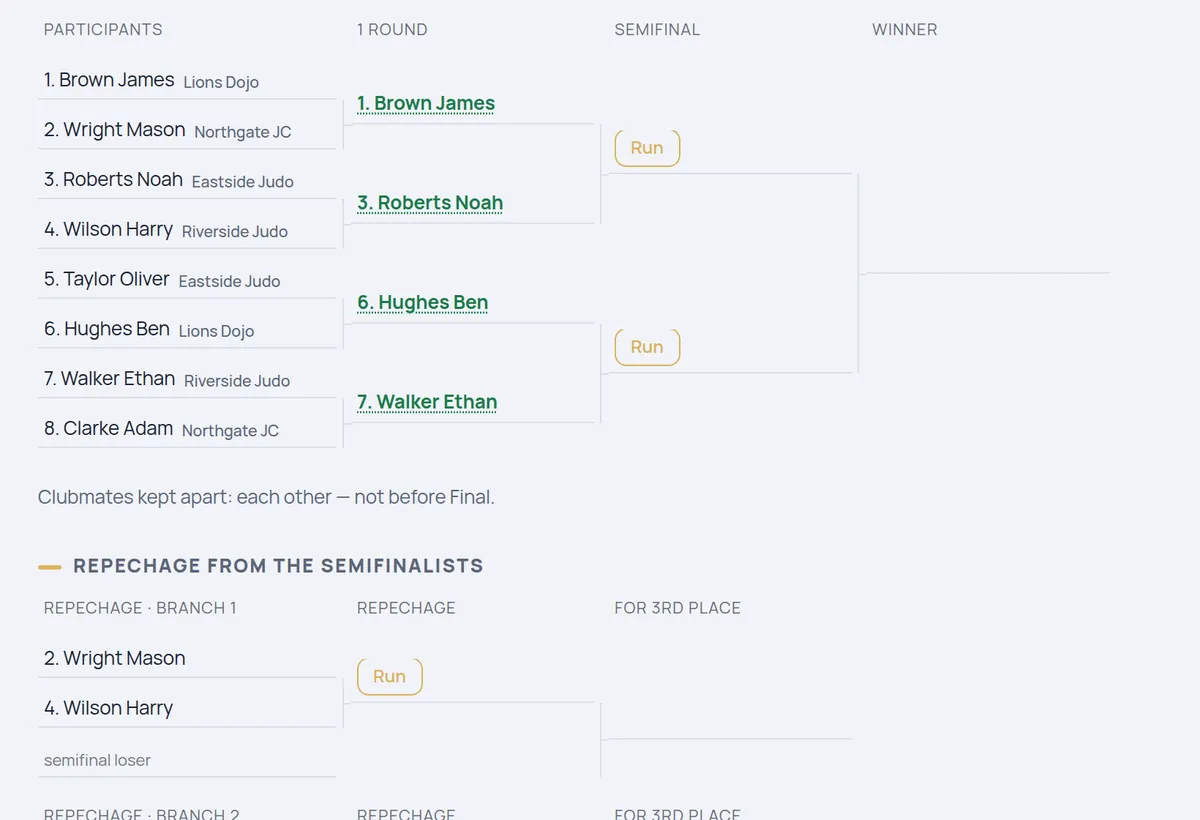
The “Tournament” edition runs the whole tournament on the phones of the officials: lists, mat assignments and results travel over the hall Wi-Fi or as files through messengers, with no servers.
- Entries from Excel and guest lists from coaches
- Weigh-in: the category is filled in automatically
- Draw: round robin, single elimination with repechage, novices by level; seeding of the strongest and clubmates kept apart
- Mats with a bout queue; results from the mats go into the brackets by themselves
- Printable brackets, final protocol, team standings, publishing to Telegram, MAX, WhatsApp and VK
The tournament from the coach’s side
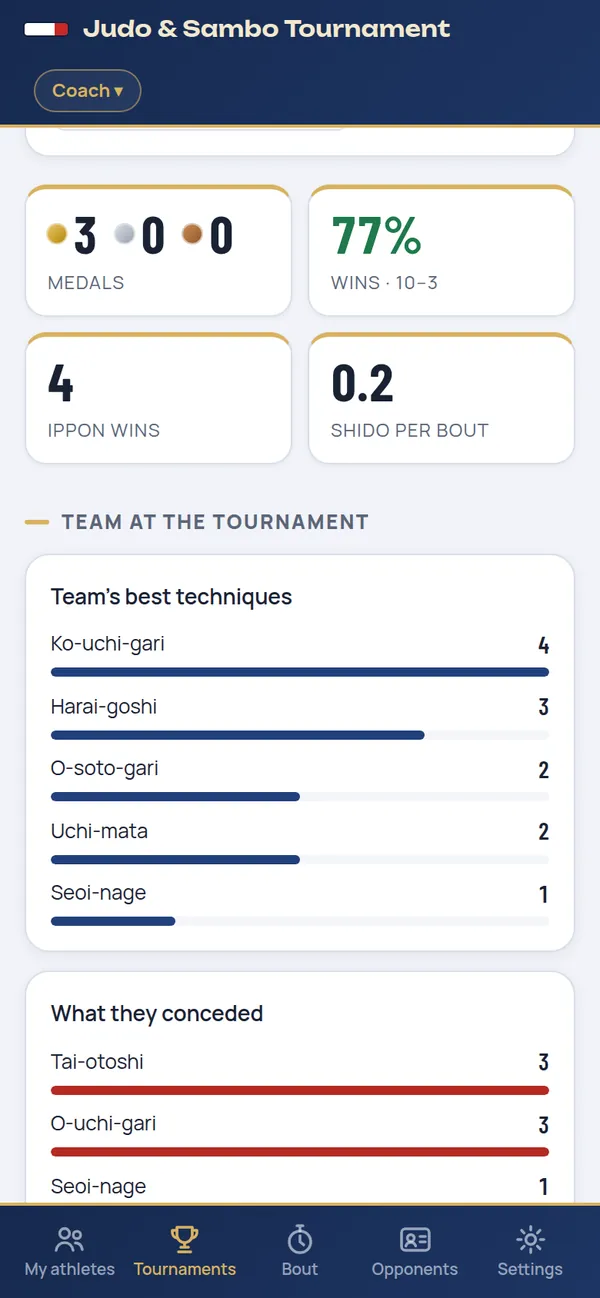
On tournament day your athletes are at hand: tap a name and the bout is open. After the tournament — results for the whole team.
- Team entry sent to the organizer as an Excel file
- Medals, win rate and clean wins of the team
- The team’s best techniques and what it conceded
- TV scoreboard over HDMI, video recording and slow-motion replay
- Video bout review: score it like a referee or do a full technical analysis of both athletes
No internet, no servers
The journal is stored only on your device: no sign-up, no cloud. Internet is needed to install, update and send files. You save a backup of the journal yourself — by hand or on a schedule.
Two versions: web and APK
Same features — choose the way to install that suits you.
Web app
iPhone, iPad, Android, Windows, macOS
- Installed from the site to the Home Screen or as an app on a computer
- One installation for all editions — the activation code sets the edition
- Upgrade to a higher edition with a new code, no reinstall
- Updates itself when opened online
APK for Android
Phones and tablets with Android 7 or later
- A regular app: a file from the site, installed in two taps
- A separate APK for each edition
- Bout videos go to the Gallery, journal backups to Downloads
- Update: install the new APK over the old one, the journal is kept
Editions
A code for a higher edition also opens the lower ones. The license is perpetual or time-limited; you can extend it or upgrade at any time — the journal is kept.
Parent
For athletes’ parents
- Diary for up to 5 athletes: your child and teammates
- Bout scoring with a scoreboard for judo and sambo
- Bout video and slow-motion replay
- Opponents, scouting and ranks
- The tournament protocol goes to the coach in one tap
- Backups, PIN code, 9 languages
Coach
For the coach and the club
- Everything in “Parent” — with no limit on athletes
- Video bout review: like a referee or a full technical analysis
- Team entry for a tournament as an Excel file in a single format
- TV scoreboard over HDMI
- At another organizer’s tournament — mat judge or weigh-in secretary
- Team analytics, PDF, Word and Excel reports
Tournament
For tournament organizers
- Everything in “Coach”
- Your own tournament: entries, weigh-in, draw, brackets
- Mats, secretary and referee roles, protocols, team standings
- Wi-Fi workstations: secretary, weigh-in, mats
- Publishing to Telegram, MAX, WhatsApp and VK
- Scoreboard ads, the “Video” tab, participant consents
The developer will send the price and payment options in reply to your request.
Tournament rental
Run a tournament without buying: the “Tournament” edition for the competition dates only. The developer will send the rental price in reply to your request.
Organizer’s laptop
One rental code: entries, weigh-in, draw, brackets, mats, scoreboard and protocols — on one laptop.
Kit: secretary, weigh-in, mats
One code for the chief secretary’s laptop with the number of mats — up to 6. The weigh-in and mats connect over Wi-Fi with an access file, no codes of their own. Mats beyond the kit are run by coaches with the “Coach” edition on their own phones.
- The code works from 00:00 on the first day to 23:59 on the last
- After the tournament, brackets and protocols remain: view, print, save
- Extend the rental or buy an edition with a new code — your data is kept
- In a rental, only the “Organizer” role: no coach journal or bout review
How to buy or rent
You buy an activation code for your device. The price, payment and code come directly from the developer. For a tournament rental, choose “Tournament rental” in the request and enter the dates.
- Install the app — it is free (how). The first screen shows your installation code.
- Fill in the request: edition, version and installation code. Not installed yet? You can send the code later.
- Send the request via Telegram, WhatsApp or e-mail — the text is put together for you.
- The developer replies with the price and payment options and sends the activation code after payment. Enter it — and the app is ready.
Install
The first launch needs internet. After that the app works offline: in the gym, at training camps, at tournaments.
- Open the app in Safari.
- Tap Share — at the bottom of the screen on iPhone, at the top on iPad.
- Choose Add to Home Screen and tap Add.
- Always open the app from this icon. The first screen shows the installation code for activation.
Option 1 — APK, a regular app
- Download the APK of your edition.
- Open the file and tap Install. If the phone asks, allow installing from this source.
- The “J&S” icon with the edition name appears on the home screen.
Option 2 — from the browser
- Open the app in Chrome.
- Menu ⋮ → Install app.
- Open the app from the new icon.
- Open the app in Chrome or Edge.
- Click the install icon in the address bar or Menu → Install app.
- The app opens in its own window and then works offline.
Download APK
Choose your edition. A new version installs over the old one — the journal is kept.
If Android shows a warning
This happens with every app that is not from Google Play. Tap Settings → Allow from this source. If Play Protect appears — More details → Install anyway.
Check that it is genuine
All APKs are signed with the same developer key — that is why updates install over the old version. Signature fingerprint (SHA-256):
Activation
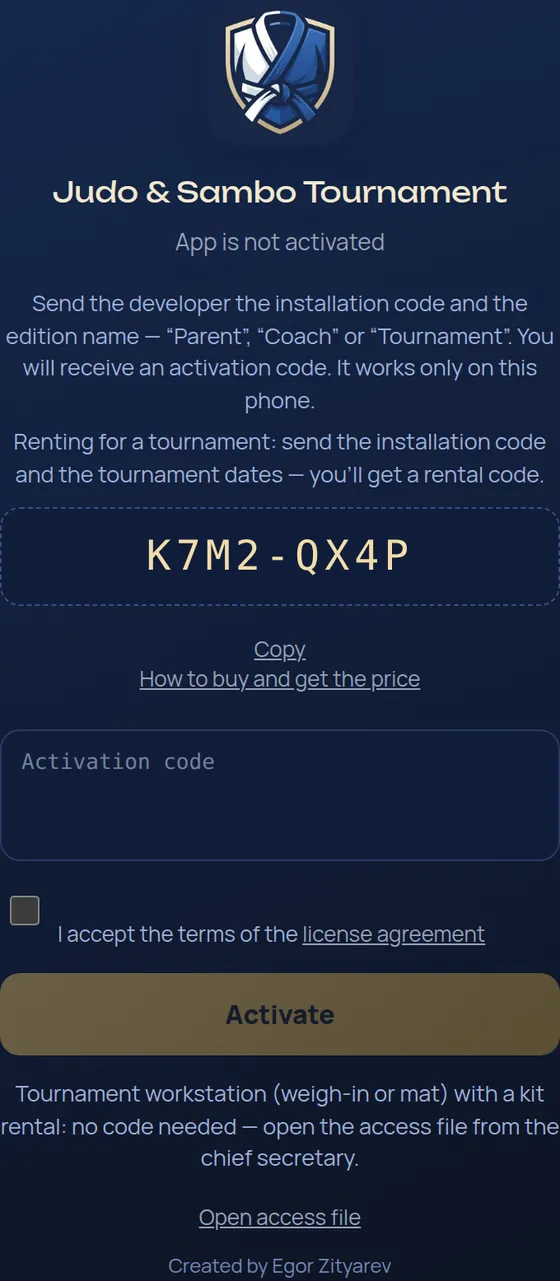
- Install and open the app. The screen shows an installation code — 8 characters.
- Send it to the developer with the name of the edition — the easiest way is the request form.
- Enter the activation code you receive, accept the license agreement and tap Activate.
FAQ
Which devices does it run on?
iPhone and iPad with iOS 15 or later, Android phones and tablets with Android 7 or later, and computers with Windows, macOS or Linux — in Chrome, Edge or Safari.
Do I need the internet?
Only to install, update and send files. Bouts, the tournament, the TV scoreboard and video all work offline — even in a gym with no signal.
Where is my data stored? Can anyone see it?
The whole journal stays only on your device: no sign-up, no servers, no cloud. The developer cannot see your data. Protocols and backups go only where you send them.
How does “Parent” help a parent and the coach?
“Parent” is an electronic athlete diary: up to 5 athletes — your child and teammates. At a tournament you score bouts like a second: scores, techniques, video and replay; opponents and ranks are counted for you.
After the tournament, the tournament card has “Send to coach”: a file with the bouts goes via Telegram, WhatsApp, MAX or e-mail. The coach opens it in their app — the bouts attach to the coach’s athletes without duplicates. This way the coach has every bout of the team, even when standing at another mat.
How does a coach send a team entry for a tournament?
In the “Coach” edition: tournament card → Team entry → Add from my athletes → tick who is going. “Entry file for the organizer” is an Excel table in a single format: surname and first name, year of birth, weight, rank, club, coach. Send it to the organizer by messenger or e-mail. An organizer with the “Tournament” edition opens it in “Entries from Excel” — the participants go into the tournament without retyping.
Can a coach work as a judge at another organizer’s tournament?
Yes, with the “Coach” edition. The tournament’s chief secretary (“Tournament” edition) sends an access file for a mat or the weigh-in — the coach opens it on their phone, and the phone becomes a workstation: the bout queue, scoreboard, video and replay, or the lists and weights. Results go to the secretary by themselves over the hall Wi-Fi or as a file. The coach’s journal doesn’t mix with the tournament. If the organizer rented a kit, coaches cover the mats beyond the rental.
Is the license perpetual or time-limited?
It can be either: the term is set in the activation code — for example, a year or perpetual. The term is shown in Settings → About; the app reminds you 14 days before the end. When the term is over, the journal, tournaments and protocols can be viewed, printed and saved, and a new code extends it — the journal is kept.
Can I rent the app for a tournament?
Yes: the “Tournament” edition for the tournament dates — for the organizer’s laptop. Open the app in Chrome or Edge and send the developer the installation code and the tournament dates — you’ll get a rental code. It works from 00:00 on the first day to 23:59 on the last. Afterwards, tournaments, brackets and protocols remain available to view, print and save; to extend the rental or buy the app — “Enter code”, and the journal is kept. In a rental the app works in the “Organizer” role — no coach journal or bout review.
Tournament kit: one rental code — for the chief secretary’s laptop, with the dates and the number of mats. The weigh-in and mats (phones or laptops) get no code: on the activation screen — “Open access file”, sent by the secretary. Each station works only in its own role and only on the rental dates. Mats beyond the kit can be run by coaches with the “Coach” edition on their own phones.
What about participants’ personal data?
Participants’ data is stored only on the organizer’s device — the app never sends it to the developer or to any server. The tournament organizer is the personal data controller: they collect consents from the participants (for children — from parents) as the law of their country requires. In the “Tournament” edition you mark on arrival who has handed in consent to data processing, publication and video, and the tournament card shows who hasn’t.
Can I buy it from outside Russia?
Yes. The interface is in 9 languages, the app works offline in any country and has judo and sambo rules built in; ranks follow your country: EVSK in Russia, CIS ranks, kyu/dan belts elsewhere. The developer will agree on a payment method with you in reply to your request.
How many devices can I activate?
An activation code is issued for one installation: each phone or computer needs its own code. Ask the developer about terms for several devices — for example, for a whole team of officials.
How do I extend the license or upgrade to a higher edition?
Extension: send the developer the installation code and enter the new code in Settings → About → Enter code — the journal is kept. A higher edition in the web app — the same way, no reinstall. APK: each edition has its own APK — install the new one and move the journal with Save backup → Restore.
How do I move the journal to a new phone?
- On the old phone: Settings → Data & security → Save backup.
- On the new phone: install the app and activate it with a new code.
- Settings → Data & security → Restore → choose the backup file.
Which rules does the scoreboard follow?
Judo: ippon, waza-ari, yuko, shido, hansoku-make, golden score. Sambo: points, activity, warnings and cautions, hold-downs and submissions, a clear lead of 8 points. The end of the bout and the winner are detected automatically — with the reason.
How is the app updated?
The web app updates itself: open it online and a few seconds later it restarts as the new version. APK: download the new file here and install it over the old one — the journal is kept.
The app does not open on iPhone
- Turn on the internet and open the app; if it does not open within 10–15 seconds, close it completely and open it again.
- If you use it in a Safari tab, open the refresh page once — the journal stays.
- On the “The app did not start” screen, tap Restart.
Do not delete the icon or clear Safari data — that erases the journal.
Android will not install the APK
Allow installation from the source you open the file from (browser, Files, messenger). If Play Protect says the app is unknown — More details → Install anyway. The signature of the genuine APK is shown in the APK section.
Which languages does the app support?
English, Russian, Kazakh, Uzbek, French, Italian, Spanish, Chinese and Japanese. Switch the language in Settings at any time.
Nothing found — write to the developer.
Updates
The web app updates itself; for the APK, download the new one.
- 3.0
- Three editions: “Parent” — an electronic athlete diary for up to 5 athletes with bout video and a “Send to coach” button; “Coach” — an unlimited journal, video review, team entries, scoreboard and working as a mat judge or at the weigh-in of another organizer’s tournament; “Tournament” — all of that plus running your own tournaments. Video recording and replay are in every edition. An activation code is perpetual or time-limited. In the Russian version, Japanese throw names come with a translation underneath.
Contact the developer
Requests, questions and suggestions — get in touch.